Register Now !
How to configure ICQ to connect to WincorHQ's Servers
1. Get ICQ
Firstly, you will need ICQ or an ICQ compatible program.
To get ICQ working correctly, please go on : Open OSCAR Server page and follow the instructions for your operating system.
After having set up ICQ to work on your device please follow with : "Domain and port configuration"
2. Domain and port configuration
Firstly, Open ICQ and press the "For admin use" button
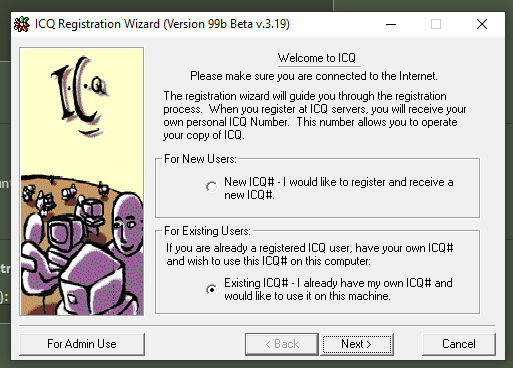
This menu should normally open. It can be slightly different depending on your version.
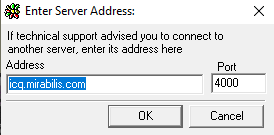
If it does not, please find another version of the ICQ client, or try reinstalling it.
Host
Then, set the settings as : "wincorhq.freeboxos.fr" for the host
You may use any alternative domain, aslong as it resloves to the same IP
Port
Leave the port as default, or if it's currently a non-standard port, set it to 4000
Complete the setup by pressing the OK/Apply Button
3. Connect to the server
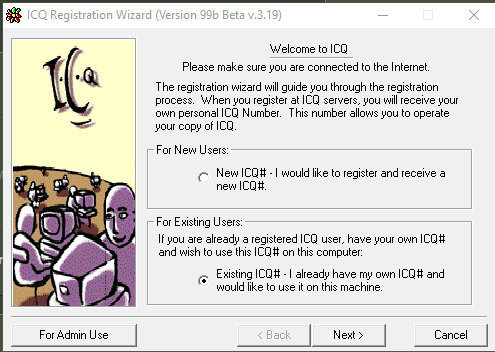
Select the second option, Existing ICQ#
Then press next.
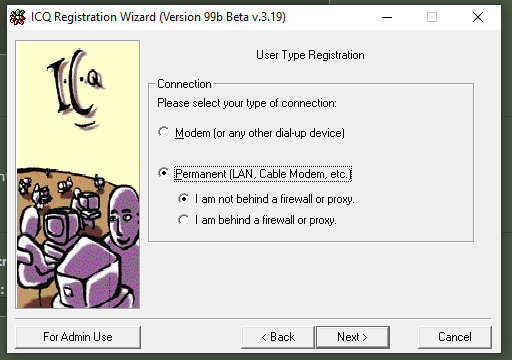
Select your connection method and specifiy if you are beind a firewall
Or a proxy, If you are under one, you will be asked to configure it
Continue setup as normal, input your credentials created on WincorHQ And you will be able to make New Friends!
You aren't an ICQ user and want to register?
Register Here!
ICQ is the newest way to meet new friends,
buddies, Communities...
Best of all? It's free.